


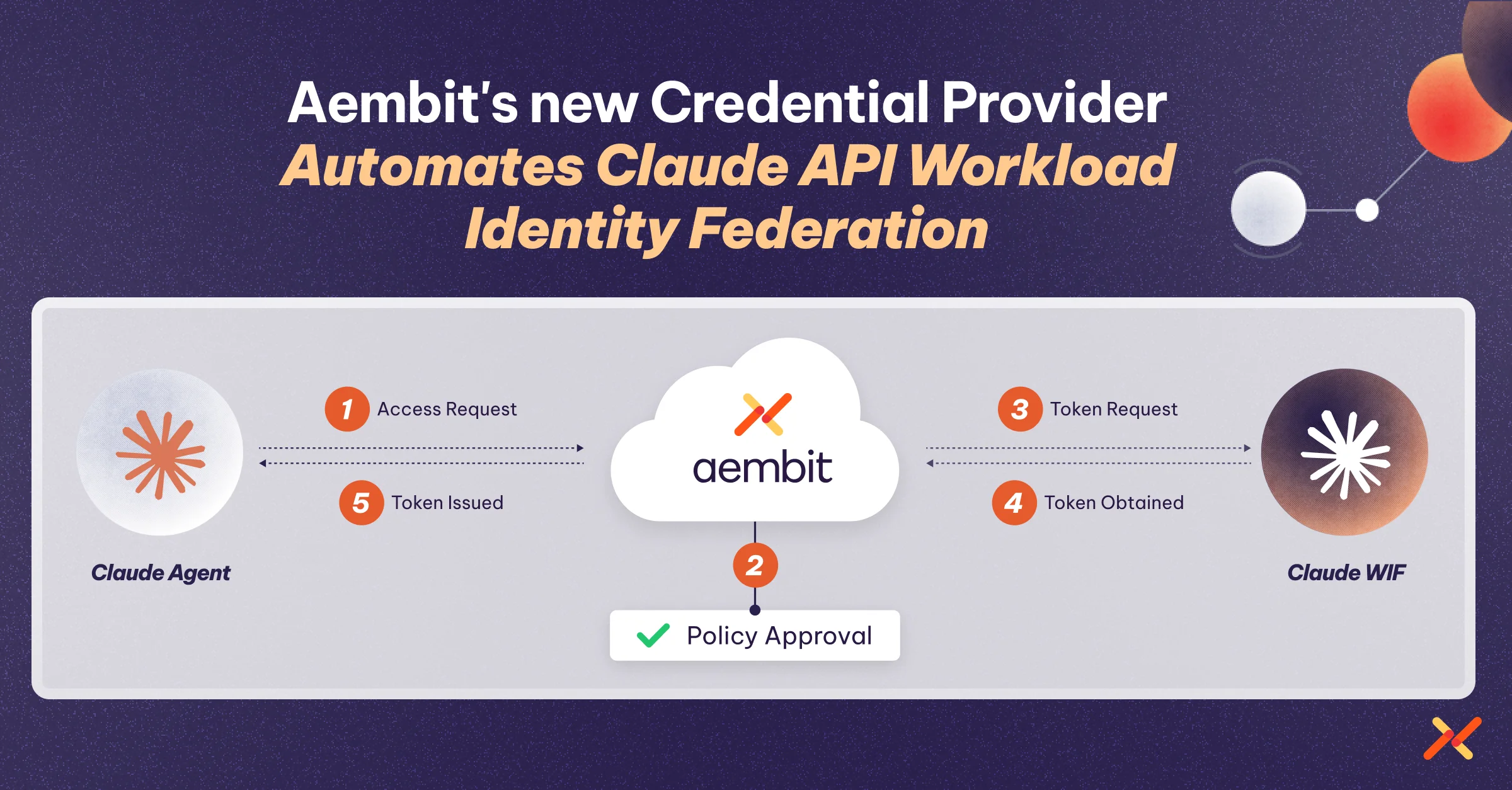
Today, we’re announcing the Aembit Claude Workload Identity Federation Credential Provider, the latest addition to Aembit’s growing Claude support. Aembit already covers a lot of ground with Claude: workloads can authenticate to the Claude API using static API key injection, Claude Web and the Claude App are supported as Client Workloads, direct API access runs through the Aembit proxy, and both inbound MCP connections to Claude and outbound Claude connections to other MCP services are secured through the MCP Authorization Service and MCP Identity Gateway. The new Claude WIF Credential Provider adds to that foundation by replacing static sk-ant-… keys with short-lived, identity-based tokens, and it extends Aembit’s WIF Credential Provider ecosystem, which already covers AWS STS, Azure Entra, and GCP, to include Anthropic’s Claude API. Teams building AI agents, internal developer tools, or application backends on Claude no longer need to manage and rotate long-lived API keys. Aembit handles the token exchange and credential injection transparently, so Claude access gets governed the same way everything else does.
Claude API Authentication Methods
The Claude API supports two authentication methods: API keys and Workload Identity Federation.
API Keys
API keys are static secrets generated in the Claude Console and passed on every request. You set the x-api-key header on direct HTTP requests, or set the ANTHROPIC_API_KEY environment variable, which the client SDKs pick up automatically. API keys have no expiry, so they must be stored in a secrets manager, rotated periodically, and revoked if a key is suspected to have leaked. Anthropic recommends them for local development, prototyping, scripts, and single-tenant servers where you control secret storage.
Workload Identity Federation (WIF)
WIF lets a workload authenticate using a short-lived identity token issued by an identity provider (IdP) the organization already trusts, such as AWS IAM, Google Cloud, or any standards-compliant OIDC issuer including GitHub Actions, Kubernetes service accounts, SPIFFE, Microsoft Entra ID, or Okta. The workload exchanges its IdP-issued JWT at POST /v1/oauth/token for a short-lived Claude API access token, and the SDK refreshes that token automatically before it expires. There is no sk-ant-api... string to mint, distribute, or rotate.
Why WIF Is Better
Federation removes long-lived Claude API keys from your environment, which shrinks the blast radius of a leaked credential and lets you manage access with the same IdP controls you already use for cloud resources. Rather than tracking, rotating, and auditing a proliferation of static sk-ant-... strings across services, you get access governance that ties directly into the identity infrastructure you already operate.
The migration is also straightforward. To configure federation, you create three resources in the Claude Console — a service account, a federation issuer, and a federation rule — and then point your SDK at the rule. The Anthropic docs cover step-by-step guides for AWS, Google Cloud, Azure, GitHub Actions, Kubernetes, SPIFFE, and Okta.
How It Works Better with Aembit
Source: docs.aembit.io/user-guide/access-policies/credential-providers/claude-workload-identity-federation
Even with native WIF support, teams still need to manage the federation configuration, perform the token exchange, inject credentials into outbound requests, and handle token refresh — all per workload. That’s where Aembit’s Claude WIF Credential Provider takes over.

Aembit’s Credential Provider for Claude Workload Identity Federation lets Client Workloads authenticate to the Claude API with short-lived tokens instead of long-lived API keys. Aembit obtains those tokens on the workload’s behalf. Aembit acts as a third-party federated Identity Provider (IdP), and Claude trusts Aembit as an OIDC issuer. When an Access Policy grants a Client Workload access, Aembit exchanges its issued assertion for a short-lived Claude access token.
What this means in practice: workloads calling the Claude API don’t need to know anything about WIF mechanics, token exchange, or credential rotation. The Aembit EdgeController intercepts outbound requests, performs the federation token exchange against Claude’s OAuth endpoint, and injects the resulting short-lived bearer token — all transparently and without any changes to the workload’s application code.
This extends Aembit’s existing WIF Credential Provider pattern (already in production for AWS STS, Azure Entra, and GCP) to cover Claude, meaning teams that already manage workload access through Aembit can add Claude API access under the same policy model they use everywhere else.
Integration: How to Configure It
Prerequisites
To configure a Claude WIF Credential Provider, you need the ability to access and manage your Aembit Tenant and the ability to access and manage a Claude Console organization, service account, and federation rule. Your Aembit OIDC Issuer URL must also be publicly reachable over HTTPS on port 443, as Claude performs OIDC discovery and JWKS retrieval against that URL.
Step 1: Create the Credential Provider in Aembit
Log in to your Aembit Tenant and click Credential Providers, then click New. Enter a name and optional description. In the Credential Type dropdown, select Claude Workload Identity Federation. Copy the OIDC Issuer URL, which Aembit auto-generates as a dedicated endpoint for OIDC authentication with Claude. You’ll paste it into Claude Console in the next step.
Step 2: Register Aembit as a Federation Issuer in Claude Console
In Claude Console, use the OIDC Issuer URL you copied from Aembit to register Aembit as a federation issuer. Then create the service account and federation rule that Aembit’s tokens map to. When you register the issuer, choose the generic OIDC option rather than the AWS or Google Cloud presets, and keep the default JWKS source of Discovery. Aembit’s OIDC Issuer URL serves the .well-known/openid-configuration endpoint that Claude uses for discovery.
When you create the federation rule, its match conditions must match the claims in the token Aembit presents. If you set an audience match condition, it must equal the Audience value you enter in Aembit.
Record these values from Claude Console before returning to Aembit: the Federation Rule ID (starts with fdrl_), the Organization ID (formatted as a UUID), the Service Account ID (starts with svac_), and the Workspace ID (starts with wrkspc_).
Step 3: Complete the Credential Provider in Aembit
Return to the Aembit web UI and complete the Credential Provider page. Enter the Federation Rule ID, Organization ID, Service Account ID, and Workspace ID from Claude Console. For Scope, leave the default value of workspace:developer. For Audience, leave this field blank unless your federation rule requires a specific audience. For Lifetime, keep the default of 3600 seconds or enter a value between 300 and 43200 seconds.
Step 4: Verify
On the Credential Providers page, select the Credential Provider you just created and click Verify. After a few moments, a green banner should display a “Verified Successfully” message. If verification fails, recheck the values in your Aembit Credential Provider against the federation rule, service account, and organization in Claude Console.
Add this new Credential Provider to your policy and you’re now using Claude’s WIF to authenticate all API calls to Claude. No more generating and managing API keys.
Beyond Aembit’s Admin Portal: Terraform Support
The Credential Provider can also be configured using the Aembit Terraform Provider. In the claude_wif block, federation_rule_id, organization_id, and service_account_id are required. The audience, scope, and workspace_id fields are optional. If you omit scope, it defaults to workspace:developer. Aembit requires lifetime and defaults it to 3600 seconds. Full argument reference is available in the Aembit Terraform Registry.
Conclusion
Anthropic’s addition of WIF support to the Claude API is a meaningful step forward for teams building production AI workloads at scale. It addresses one of the more persistent operational pain points in non-human identity: the sprawl of long-lived API keys that are difficult to rotate, scope, and audit. Aembit’s Claude WIF Credential Provider takes that foundation further by handling the token exchange and credential injection transparently, fitting Claude into the same identity-based access model that already governs the rest of a workload’s service-to-service traffic. For teams already using Aembit, adding Claude is a matter of a new credential provider and an access policy. For teams evaluating their approach to AI agent security, this integration represents the kind of keyless, policy-driven access that the NHI space has been moving toward across the board.
FAQs
What is Workload Identity Federation for the Claude API?
sk-ant-... API keys, so there is no long-lived secret to store, rotate, or leak.How does Aembit’s Claude WIF Credential Provider work?
Do I still need to manage a Claude API key?
sk-ant-... key to generate, distribute, or rotate for workloads using that policy.


